

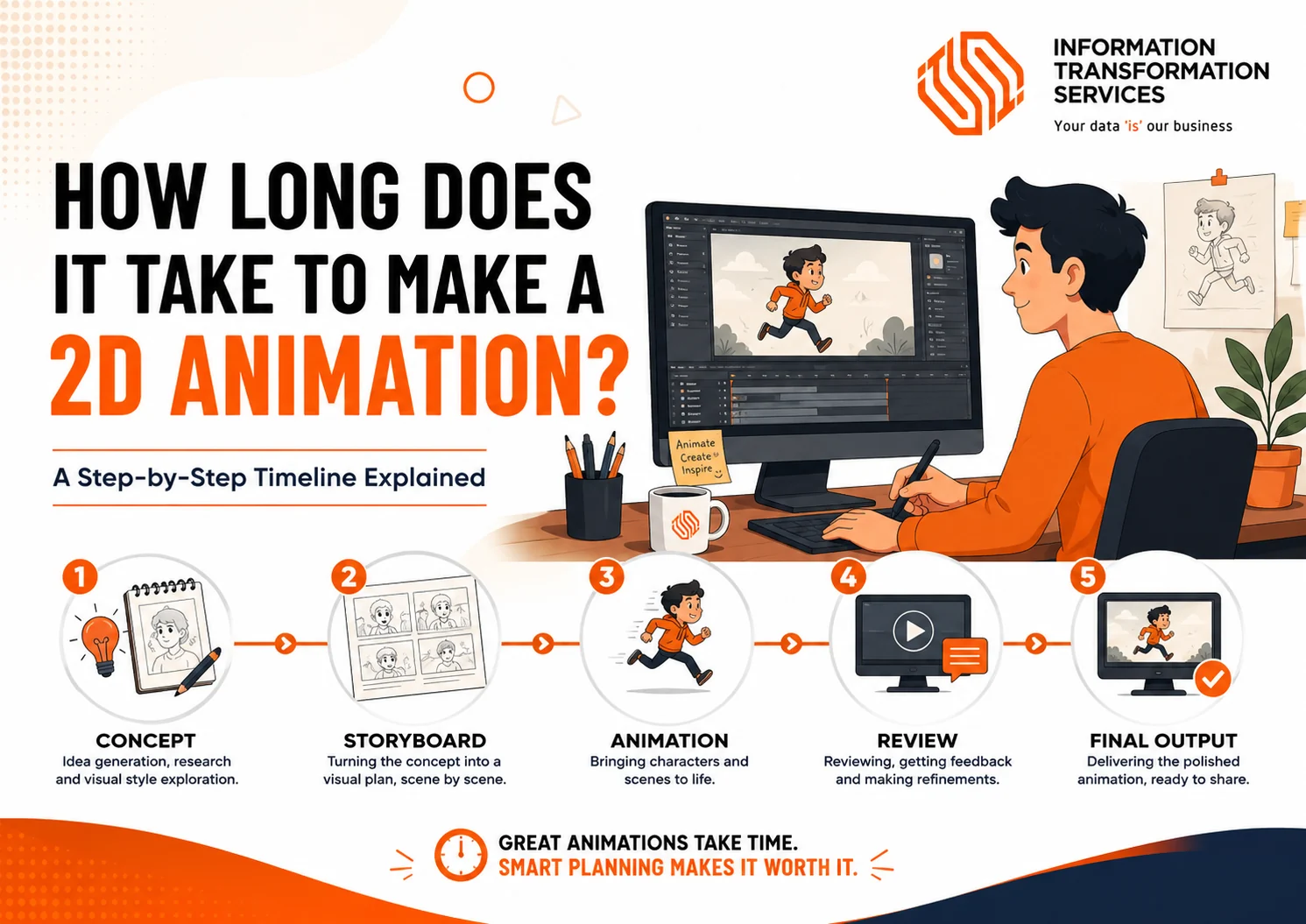
How Long Does It Take to Make a 2D Animation?
A professional 2D animation typically takes 2 to 12 weeks to produce, although larger or highly customized projects can take several months. The exact timeline depends on factors such as the video’s length, animation style, script complexity, custom illustrations, revision rounds, and the overall production workflow.
Understanding how each stage of the animation process affects production time can help you plan your project more effectively, avoid unnecessary delays, and set realistic expectations. From scripting and storyboarding to design, animation, quality assurance, and final delivery, every step contributes to the overall schedule.
This guide explains how long different types of 2D animation projects typically take, breaks down each stage of the production process, explores the factors that influence delivery timelines, and shares practical tips to help you complete your animation project efficiently.
How Long Does a 2D Animation Project Take? A Step-by-Step Timeline
A 2D animation project moves through several production stages before the final video is ready. The timeline depends on how quickly each stage is completed, how complex the visuals are, and how efficiently feedback is managed. The steps below show what happens during a typical animation production process.
Step 1: Define Your Project Requirements
Timeline: 1–3 Business Days
Start by defining what you want the animation to achieve. A clear project brief helps the production team make better decisions about the script, visual style, and overall direction.
Before production begins, prepare:
- The main goal of the video.
- Your target audience.
- The expected video length.
- Preferred animation style.
- Brand guidelines and visual references.
- Required delivery date.
- Approval process and decision-makers.
Why this step matters:
Unclear requirements often create delays later because the team may need to redesign scenes, adjust messaging, or change the animation direction.
Step 2: Develop and Approve the Script
Timeline: 2–5 Business Days
The script defines the message, narration, and structure of your animation. The production team uses the approved script as a foundation for storyboarding and visual development.
During this stage:
- Define the main message.
- Organize the information into a clear story.
- Match the script length with the desired video duration.
- Identify important visuals that support the narration.
- Review and approve the final version.
Why this step matters:
Changing the script after animation begins can affect scenes, voice-over timing, and completed artwork, which increases production time.
Step 3: Create the Storyboard
Timeline: 2–4 Business Days
The storyboard transforms your script into a visual plan. It shows how each scene will appear before designers and animators begin creating the final animation.
The storyboard includes:
- Scene-by-scene visuals.
- Character actions.
- Camera movements.
- Text placement.
- Key transitions.
- Visual storytelling direction.
Your role during this stage:
- Review the flow of the story.
- Confirm that visuals match the message.
- Identify missing information.
- Approve changes before animation begins.
Why this step matters:
Making changes on a storyboard is faster and easier than changing completed animation scenes.
Step 4: Design Characters, Backgrounds, and Visual Assets
Timeline: 3–7 Business Days
The design stage creates all visual elements required for the animation. Designers develop the artwork that animators will later bring to life.
This stage usually includes:
- Character design.
- Background environments.
- Icons and illustrations.
- Product visuals.
- Infographics.
- Brand elements.
- User interface designs.
Your role during this stage:
- Review the visual style.
- Confirm brand consistency.
- Approve characters and important design elements.
Why this step matters:
A complete and approved design package allows animators to work efficiently without stopping for missing assets or design changes.
Step 5: Animate the Approved Designs
Timeline: 5–15 Business Days
Animation is where static artwork becomes a moving story. Animators create movement, timing, transitions, and effects based on the approved storyboard and designs.
The animation stage includes:
- Character movements.
- Scene transitions.
- Camera movements.
- Motion graphics.
- Text animation.
- Visual effects.
- Voice-over synchronization.
Your role during this stage:
- Review progress at agreed milestones.
- Provide focused feedback.
- Avoid changing the original concept unless necessary.
Why this step matters:
Animation requires the most production time because every movement, transition, and visual detail needs careful adjustment.
Step 6: Review, Revise, and Complete Quality Checks
Timeline: 2–5 Business Days
The completed animation goes through a final review process to identify improvements before delivery.
Check:
- Visual consistency.
- Audio synchronization.
- Brand accuracy.
- Text accuracy.
- Scene timing.
- Overall message clarity.
Your role during this stage:
- Collect feedback from all stakeholders.
- Submit one complete revision list.
- Approve the final version.
Why this step matters:
Organized feedback helps complete revisions faster and prevents repeated editing cycles.
Step 7: Export and Deliver the Final Animation
Timeline: 1–2 Business Days
The final stage prepares your animation for publishing and distribution.
The production team:
- Exports the final video files.
- Check video and audio quality.
- Confirms required formats.
- Prepares files for different platforms.
Before closing the project, confirm:
- Final video files.
- Required formats.
- Source files (if included in the agreement).
- Future update requirements.
Why this step matters:
Proper delivery ensures your animation works correctly across websites, social media platforms, presentations, and internal systems.
How Long Do Different 2D Animation Projects Take?
Every 2D animation project follows a different production timeline because every project has a different scope. The animation style, number of scenes, custom illustrations, character design, voice-over, and revision process all determine how much time the production team needs to deliver a polished final video.
The quickest way to estimate your timeline is to identify the type of animation project you’re planning. A simple motion graphics video typically moves through production faster because it relies on existing design elements and straightforward animations. In contrast, a character-driven explainer or commercial requires additional stages such as concept development, custom asset creation, lip-sync animation, and detailed scene animation, which naturally extend the production schedule.
After identifying your project type, review these four production requirements. They have the greatest impact on the final delivery schedule:
- A finalized script keeps production moving without costly revisions.
- Brand assets such as logos, colors, fonts, and style guidelines reduce design time.
- The animation style determines the level of creative work required, from simple motion graphics to fully customized character animation.
- A structured approval process with timely feedback helps every production stage stay on schedule.
These timelines represent professional production estimates based on a structured animation workflow. Every project still requires an individual production plan because creative requirements, asset complexity, and revision cycles vary from one animation to another.
How Long Does It Take to Animate Different Video Lengths? Typical Production Timelines
Video length plays a major role in determining the 2D animation production timeline, but it isn’t the only factor. The animation style, number of custom assets, revision rounds, and overall project complexity also affect how long production takes. The estimates below reflect typical timelines for professional 2D animation services.
| Video Length | Typical Production Timeline | Common Use Cases |
|---|---|---|
| 30 Seconds | 2–4 Weeks | Social media ads, product teasers |
| 60 Seconds | 4–6 Weeks | Explainer videos, SaaS demos |
| 90 Seconds | 6–8 Weeks | Product walkthroughs, brand stories |
| 2 Minutes | 8–10 Weeks | Training videos, detailed explainers |
| 5 Minutes | 3–5 Months | eLearning, tutorials |
| 10 Minutes | 5–8 Months | Educational series, short films |
30-Second Animation
Most 30-second 2D animation projects take 2–4 weeks to complete. This format is ideal for social media ads, product promotions, and short marketing campaigns. Simple motion graphics can move through production faster than fully customized character animations.
60-Second Animation
For many businesses, 60 seconds is the preferred length for an explainer video. Production usually takes 4–6 weeks, allowing enough time for scriptwriting, storyboarding, custom illustrations, animation, and client reviews.
90-Second Animation
Expect a 90-second animation to take around 6–8 weeks. The extra runtime adds more scenes, transitions, and visual assets, which naturally extends the production schedule.
2-Minute Animation
Producing a 2-minute 2D animation typically requires 8–10 weeks. This length works well for product demonstrations, employee training, and educational videos that need more detailed storytelling.
5-Minute Animation
A 5-minute project generally takes 3–5 months because it involves significantly more design, animation, editing, and quality assurance. Longer videos also require additional review cycles to maintain consistency across every scene.
10-Minute Animation
Creating a 10-minute 2D animation can take 5–8 months, depending on the animation style and production scope. These projects are commonly used for training programs, educational content, and animated short films that demand more planning and detailed production.
How to Speed Up Your 2D Animation Project
A well-planned project always moves through production faster than one that requires constant revisions. Follow these practical steps to reduce delays and keep your animation project on schedule.
Step 1: Finalize Your Script Before Production
Approve the script before storyboarding or animation begins. Script changes during production often require scenes to be redesigned and reanimated.
Step 2: Share All Project Assets Upfront
Provide your logo, brand guidelines, fonts, color palette, product screenshots, and reference materials before production starts. Complete project assets help the team begin work without interruptions.
Step 3: Choose One Decision-Maker
Assign one person to collect feedback and approve each production milestone. A single point of contact prevents conflicting revision requests and speeds up approvals.
Step 4: Review Every Milestone Carefully
Take time to review the script, storyboard, visual assets, and animation before approving the next stage. Early corrections are faster and more cost-effective than changes made during animation.
Step 5: Combine Feedback into One Revision Round
Collect comments from all stakeholders and submit them together. Consolidated feedback reduces repeated revisions and keeps the production schedule on track.
Step 6: Avoid Scope Changes During Production
Adding new scenes, features, or messages after animation begins increases production time because completed work often needs to be updated.
Check These Before Estimating Your 2D Animation Timeline
Every project is different, but you can estimate your production timeline by answering the questions below. The more “yes” answers you have, the more production time your animation is likely to require.
Check 1: How Long Will Your Animation Be?
Longer videos require more scenes, illustrations, animation, reviews, and quality checks. Estimate the video’s duration before requesting a production timeline.
- 30 Seconds
- 60 Seconds
- 90 Seconds
- 2 Minutes or Longer
Check 2: Which Animation Style Fits Your Project?
The animation style directly affects the amount of design and animation work required.
- Motion Graphics
- Explainer Animation
- Character Animation
- Whiteboard Animation
- Educational Animation
Check 3: Do You Need Custom Illustrations?
Original characters, backgrounds, icons, and branded graphics require additional design time compared to existing visual assets.
- Custom Characters
- Custom Backgrounds
- Product Illustrations
- UI Screens
- Infographics
Check 4: Is Your Script Ready?
A finalized script allows production to begin immediately. Script revisions after production starts often increase the overall timeline.
- Script Approved
- Scene Breakdown Complete
- Call-to-Action Confirmed
Check 5: Who Will Approve the Project?
Projects move faster when one person manages feedback and approvals.
- One Decision-Maker
- Multiple Stakeholders
- Weekly Review Schedule
Check 6: Are Your Brand Assets Ready?
Preparing project files before production reduces delays.
- Logo
- Brand Guidelines
- Fonts
- Color Palette
- Product Screenshots
- Reference Materials
Projects with an approved script, complete brand assets, and a structured review process typically move through production more efficiently because the team spends less time waiting for information and more time creating the animation.
Behind the Scenes: How ITS Manages 2D Animation Projects
At ITS, every 2D animation project follows a structured production workflow supported by dedicated quality assurance reviews. Our ISO-certified processes help maintain consistent quality, secure project handling, and clear documentation throughout the production lifecycle, giving clients confidence that every milestone is managed with care and professionalism.
Our Production Workflow
✔ Dedicated Project Manager
Every project is assigned a single point of contact to coordinate communication, track progress, and keep production milestones on schedule.
✔ Clear Production Milestones
The project moves through defined stages, including project planning, script approval, storyboarding, visual design, animation, quality assurance, and final delivery.
✔ Scheduled Review Cycles
Client feedback is collected at key milestones instead of after the entire project is completed. This approach helps identify changes early and minimizes production delays.
✔ Custom Animation for Every Project
Each animation is created to match the client’s objectives, brand identity, target audience, and communication goals rather than relying on pre-built templates.
✔ Quality Assurance Before Delivery
Every animation is reviewed for visual consistency, audio synchronization, branding accuracy, and overall quality before the final files are delivered.
Why This Process Matters
A structured workflow provides clear expectations for every production stage, making it easier to monitor progress, manage revisions, and deliver a polished animation within the agreed timeline. While every project has unique requirements, following an organized production process helps reduce avoidable delays and creates a more efficient experience for both the production team and the client.
Conclusion
Creating a successful 2D animation is about more than meeting a deadline; it’s about following a well-planned production process that balances creativity, quality, and efficiency. Every project has unique requirements, and factors such as animation style, custom assets, stakeholder feedback, and production scope all influence the overall timeline.
By defining your goals early, finalizing your script, preparing brand assets, and maintaining a structured review process, you can minimize delays and keep production moving smoothly from concept to final delivery. Careful planning not only saves time but also helps ensure the finished animation communicates your message effectively.
Whether you’re producing an explainer video, product demonstration, educational animation, or marketing campaign, understanding the production workflow allows you to make informed decisions and set realistic expectations