


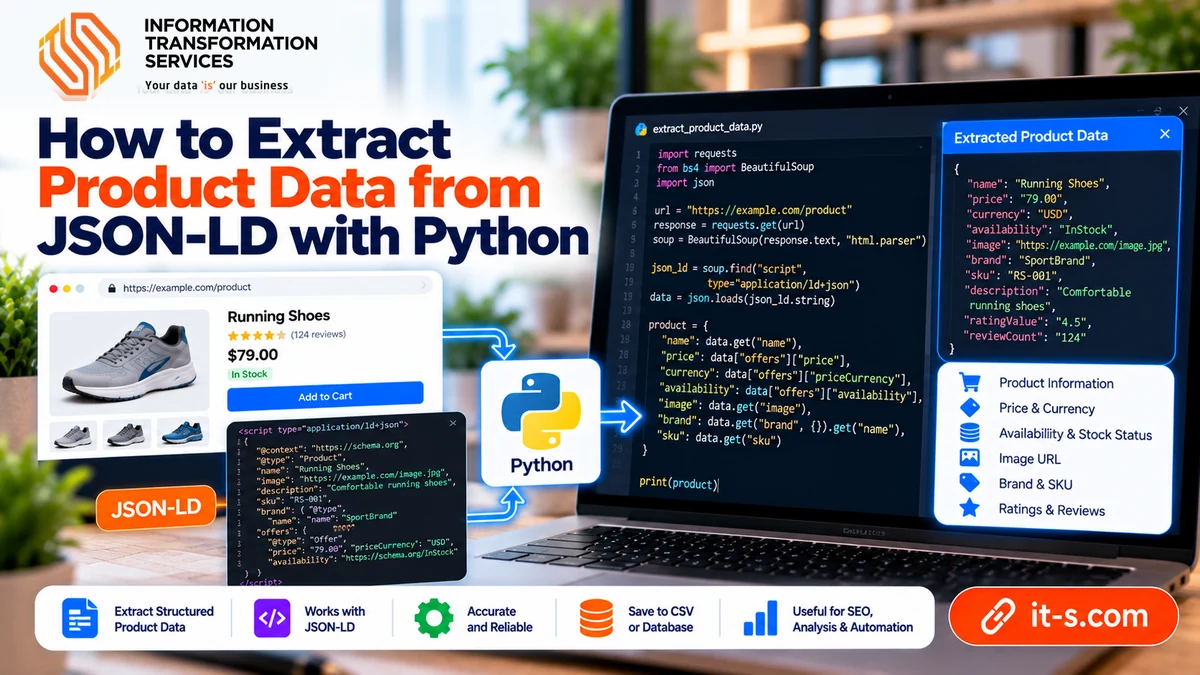
How to Extract Product Data From JSON-LD With Python
Many modern websites expose useful product, article, organization, event, review, and breadcrumb data in JSON-LD. Instead of reconstructing every field from visible HTML, a scraper can sometimes read this structured data directly from script tags in the page. When the markup is complete and accurate, JSON-LD can provide cleaner names, prices, availability, SKUs, brands, images, ratings, and canonical URLs with less selector logic.
That does not mean JSON-LD should be trusted blindly. Some sites publish incomplete schemas, stale prices, duplicated objects, or marketing-oriented values that differ from what the page currently displays. The most reliable workflow uses JSON-LD as a structured source, validates it against the page, and falls back to HTML only where the schema is missing or insufficient.
Understand Where JSON-LD Appears
JSON-LD is commonly embedded inside a script element with the type application/ld+json. The script contains structured objects that describe the page using schema.org vocabulary. A product page may expose a Product object, an Offer, a Brand, an AggregateRating, and breadcrumbs in one or more blocks.
A page can contain several JSON-LD scripts, so a scraper should not assume that the first block contains the product data. It may instead describe the website, organization, or breadcrumb trail. The extraction logic should inspect each parsed object and identify the one whose type matches the data you need.
Fetch the Page Normally First
For pages where JSON-LD is included in the initial HTML response, a simple HTTP request is often enough. Fetch the page, parse the HTML, locate all script elements with the JSON-LD MIME type, and pass their text content to a JSON parser.
The basic request and parsing pattern is the same foundation described in using Python to get data from a website. The difference is that instead of extracting visible elements with CSS selectors, the scraper reads structured objects embedded in the document.
Parse Every JSON-LD Block Safely
Do not assume every script contains perfectly formatted JSON. Some sites include whitespace, arrays, multiple objects, or graph structures. Others may publish malformed data that requires the scraper to skip the block rather than fail the entire page.
Wrap JSON parsing in controlled error handling. If one block cannot be parsed, log the URL and continue inspecting the others. A single bad script should not prevent the scraper from collecting valid data from the same page.
Handle Arrays and Graph Structures
JSON-LD may be represented as one object, a list of objects, or an object containing an @graph array. Your parser should normalize these structures into a list of candidate objects so the rest of the extraction logic does not depend on one specific layout.
Once normalized, inspect each object’s @type field. The type can itself be a string or a list. A robust parser should recognize the target even when an object declares several compatible types.
Find the Product Object Instead of Matching Position
Do not rely on script order. Search for an object whose @type includes Product. Then inspect nested fields such as name, sku, mpn, brand, image, description, offers, and aggregateRating.
This semantic approach survives many page redesigns because it depends on the meaning of the object rather than where the script appears in the document. It also reduces the fragility that comes from long CSS paths tied to presentation markup.
Normalize Brand Values
The brand field can appear as a plain string or as an object containing a name. A parser should handle both. Similar variation can occur in manufacturer, seller, and category fields.
Normalize the extracted value into the format your dataset expects. This is especially important for ecommerce projects where product information from several domains must later be compared or merged.
Handle Offers That Appear in Different Shapes
Product price data is often stored under offers, but the structure varies. One page may provide a single Offer object, another may provide an AggregateOffer, and another may use a list because several sellers or variants are available.
Your scraper should identify the business meaning you actually need. A single current selling price, lowest offer price, high-low range, and seller-specific offers are different outputs. Do not simply take the first numeric field without understanding the schema.
Extract Price and Currency Together
A price without its currency can be misleading. Store the numeric price together with priceCurrency whenever both are available. If a page uses multiple currencies, do not infer currency from the domain alone.
Normalize price strings into numeric values only after preserving the original field for debugging. Commas, decimal separators, and localized formatting should be handled consistently before values are written into the final dataset.
Map Availability to a Controlled Value
Availability is often represented as a schema URL or vocabulary value such as InStock, OutOfStock, PreOrder, or BackOrder. Convert those values into a controlled internal representation rather than storing a mixture of full URLs and text labels.
Keep the mapping explicit. A standardized availability field makes later filtering and change detection much easier, especially when several websites use different visible wording.
Treat Images as a List
The image field may contain one URL, a list of URLs, or objects depending on the site. Normalize the result into a list so the scraper can consistently store the primary image and any additional gallery images.
Do not assume every image in JSON-LD is the highest-resolution version. If image quality matters, compare the structured URLs with the page gallery or source-set data before choosing the final asset.
Validate JSON-LD Against Visible Page Data
Structured markup can become stale because it is generated by a different part of the website than the visible interface. Compare important fields such as name, price, availability, SKU, and variant selection against the page during testing.
If the JSON-LD price repeatedly differs from the visible selling price, the structured field should not be treated as the sole source. The broader web scraping data quality workflow is useful here because validation should happen before inconsistent data reaches downstream systems.
Use HTML Fallbacks for Missing Fields
Some sites publish only a minimal Product object. The schema may contain name and image but omit stock, specifications, shipping information, or variation details. In that case, combine JSON-LD extraction with targeted HTML selectors.
Structure the scraper so JSON-LD is the preferred source for supported fields, while HTML acts as a fallback or supplement. This produces cleaner logic than duplicating the same field extraction in several unrelated parts of the code.
Be Careful With Product Variants
Variant-heavy pages can expose only the default product in JSON-LD even when the visible page allows users to select size, color, storage, or other options. In other cases, several Offer objects may represent variants without clearly labeling them.
If variant-level data matters, test whether selecting an option changes the page source, an API response, or another structured object. Do not assume the initial JSON-LD describes every sellable variation.
Capture Ratings and Review Counts Carefully
AggregateRating can provide ratingValue and reviewCount or ratingCount, but these fields should be interpreted in context. A rating of 4.7 without knowing whether it comes from 3 reviews or 30,000 reviews has limited analytical meaning.
Store the value and count together. If the website exposes several rating systems, confirm which one the structured markup represents before comparing it with other domains.
Log the Source Used for Each Field
For maintainable scrapers, record whether a value came from JSON-LD, visible HTML, an API response, or another source. This is useful when the site changes and one extraction path begins returning different values.
Production web scraping is easier to troubleshoot when the dataset can explain where important fields originated rather than presenting every value as if it came from the same method.
Monitor Structured Data for Schema Changes
JSON-LD is more stable than many visual selectors, but it can still change. A site may rename fields, move from Offer to AggregateOffer, remove structured markup, or generate different objects after a platform migration.
Track field presence and parse success rates over time. If the percentage of pages containing Product objects suddenly falls, alert the scraper before large amounts of incomplete data are accepted.
Conclusion
JSON-LD can make web scraping simpler because it exposes structured page meaning directly inside the HTML. Product names, identifiers, brands, offers, prices, availability, images, ratings, and canonical relationships can often be extracted with less dependence on fragile visual selectors.
The safest approach is still validation rather than blind trust. Parse every candidate block, normalize different schema shapes, confirm important values against the visible page, and keep HTML fallbacks for missing fields. When used this way, JSON-LD becomes a strong structured source that can make ecommerce scraping both cleaner and easier to maintain.