


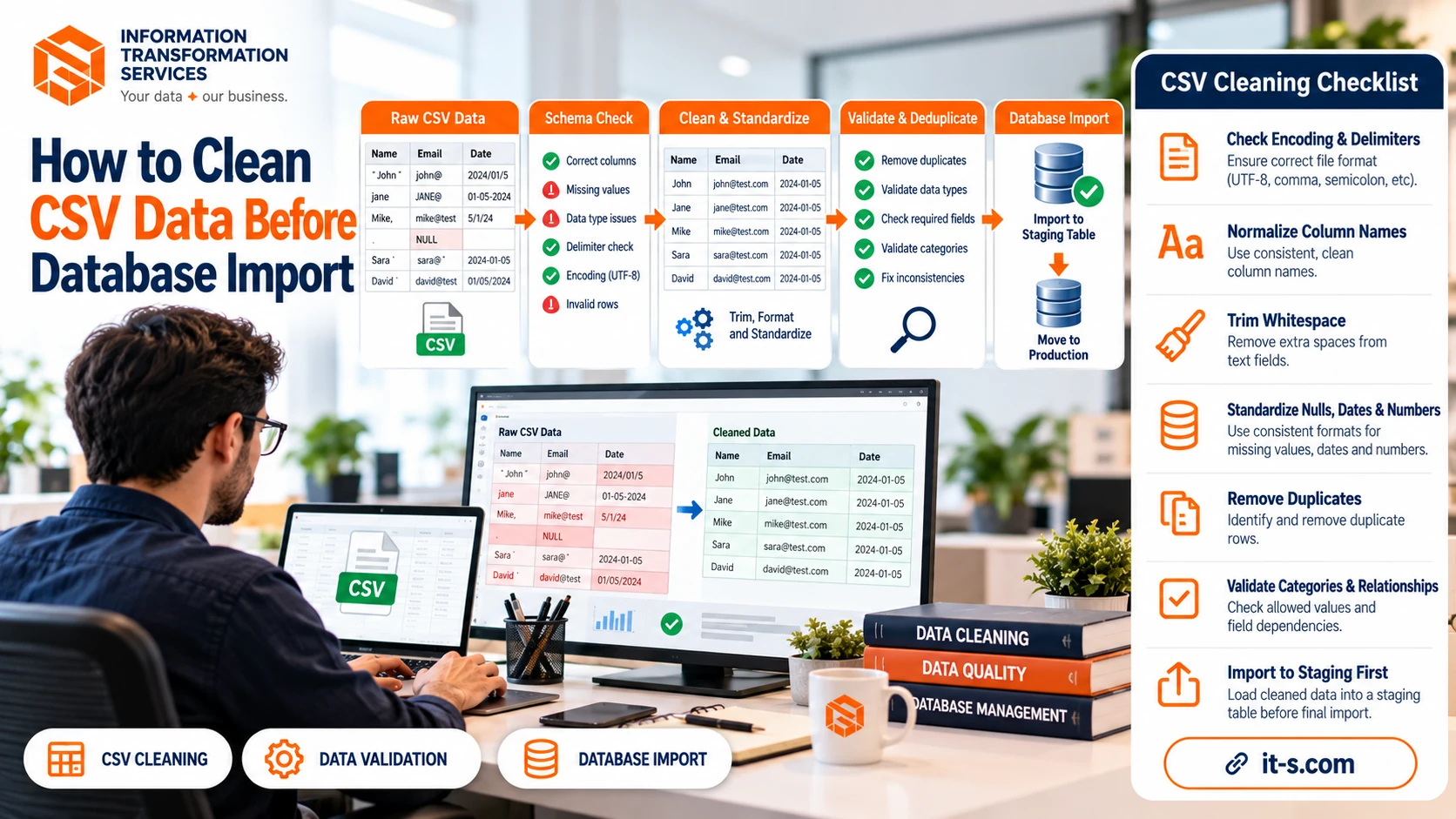
How to Clean CSV Data Before Database Import
A CSV file can look simple because it is only rows and columns, but importing it directly into a database can create expensive problems. A single column may contain mixed date formats, numeric fields can include commas or currency symbols, blank cells may mean different things, duplicate records may already exist, and invisible whitespace can make two apparently identical values behave differently. Once those issues enter a production database, they become harder to detect because the database treats them as stored facts rather than temporary import errors.
Cleaning CSV data before import is therefore not cosmetic work. It is a validation step between raw data and structured storage. The objective is to make every row conform to the schema and business rules of the destination system before the data reaches permanent tables. A reliable process checks structure, encoding, field types, missing values, duplicates, identifiers, dates, numeric formats, categories, and relationships between fields. It also preserves the original file so every correction can be traced and reproduced.
Start With the Destination Schema
The database should define the rules for the CSV, not the other way around. Before cleaning begins, review the destination table and identify the expected columns, data types, maximum lengths, required fields, primary keys, foreign keys, and allowed values. If the database expects an integer customer_id, a date in a standard date type, and a country code with two characters, the CSV should be transformed to match those requirements before import.
This prevents a common mistake where the import process guesses data types from the file. A column containing values such as 00125, 00126, and 00127 may be interpreted as integers, removing leading zeros that are actually part of an identifier. A column containing 01/02/2026 can be interpreted differently depending on locale. Define the intended meaning first, then clean toward that definition. This schema-first approach is closely related to the broader principles in data cleansing services, where quality rules are established before data is standardized.
Preserve the Original CSV Before Making Changes
Never overwrite the only copy of the source file during cleaning. Keep a raw version unchanged and create a separate working copy. This gives you an audit trail and makes it possible to rerun the process if a cleaning rule turns out to be wrong. It also helps when a stakeholder asks why a value changed between the original file and the imported record.
Check Encoding and Delimiters First
Many import failures are not caused by bad data but by file-level formatting. A CSV may use UTF-8, Windows-1252, or another encoding. It may use commas, semicolons, tabs, or pipes as delimiters. Text fields may contain commas inside quotation marks, and line breaks may appear inside long descriptions. If the parser uses the wrong settings, columns can shift and characters can become corrupted before validation even begins.
Open the file with a parser that understands quoted fields and explicitly set the expected encoding. Watch for replacement characters, broken accented letters, or unexpected question marks. Confirm that every row produces the same logical number of columns. If one row suddenly contains more fields than the header, the problem may be an unescaped delimiter or quote rather than a true schema change.
Normalize Column Names and Field Structure
Column headers often arrive with spaces, inconsistent capitalization, punctuation, or naming styles such as Customer ID, customer_id, CustomerID, and customer-id. Normalize them to one predictable convention before mapping them to database fields. This reduces import-script complexity and makes validation easier to automate.
Trim Whitespace and Standardize Text
Leading and trailing spaces are difficult to spot visually but can create duplicate categories, failed joins, and inconsistent searches. The values “London” and “London ” look identical in a spreadsheet while remaining different strings to a database. Trim surrounding whitespace from text fields and normalize repeated internal spaces where appropriate.
Case normalization can also help, but it should be field-specific. Email addresses are commonly stored in lowercase for consistency, while product names and personal names may need their original capitalization preserved. Standardize known codes such as country codes, state abbreviations, status values, and yes-or-no fields according to a defined lookup rather than applying blanket text transformations.
Convert Missing Values Into One Clear Representation
CSV files can represent missing data in many ways, including an empty cell, NA, N/A, null, NULL, none, unknown, a dash, or even a space. Before import, decide which of these values truly mean missing and convert them to the database’s intended null representation. Do not automatically convert every unusual value to null because some fields may legitimately contain words such as “None” or “Unknown.”
Required fields should be validated after normalization. If a required customer email or product SKU is missing, decide whether the row should be rejected, quarantined, or repaired from another source. Importing incomplete records and planning to “fix them later” usually creates more work because downstream systems may already begin using them.
Standardize Dates Before Import
Dates are among the most dangerous CSV fields because the same text can have different meanings. The value 03/04/2026 could mean March 4 or April 3. A single file may also mix formats such as 2026-10-04, 4 Oct 2026, and 10/04/26. Convert all valid dates to one unambiguous standard before database import.
Use the source system or business context to resolve ambiguous formats instead of guessing. Validate impossible dates such as February 30 and suspicious years that may indicate two-digit year conversion errors. Timestamps require extra care because time zones can shift the calendar date. If the database stores UTC, convert local timestamps explicitly and keep the source timezone when traceability matters.
Clean Numeric and Currency Fields
Numeric fields often contain formatting characters that a database cannot safely cast. A price column may include dollar signs, commas, spaces, parentheses for negatives, or text such as “approx.” Percentages may be stored as 12%, 0.12, or 12 depending on the source. Decide what the database expects and convert every value to that representation before loading.
Locale differences matter too. In some files, 1,234.56 means one thousand two hundred thirty-four point five six, while another locale may use 1.234,56. Never remove punctuation blindly. Parse numbers according to the known source format, validate ranges, and reject values that cannot be interpreted confidently. Financial and inventory data should also be checked for impossible negative values or unexpected decimal precision.
Find and Resolve Duplicate Records
Duplicate rows can appear because files were merged, exports overlapped, or the same entity was entered more than once. Exact duplicates are easy to detect, but real-world duplicates are often slightly different. Two customer records may share the same email but use different capitalization or phone formatting. Two products may have the same SKU but different descriptions.
Choose the deduplication key based on business meaning. A stable product ID or SKU is usually stronger than product name. For customer data, email, account number, or another verified identifier may be appropriate. If conflicting duplicates contain different valid information, define a merge rule rather than deleting one arbitrarily. The principles described in what data cleansing is are especially relevant here because deduplication is useful only when the surviving record remains accurate.
Validate Categories Against Allowed Values
Categorical fields should be checked against an approved list. A status field may contain Active, active, ACTIV, Enabled, and Yes even though the database accepts only active and inactive. Standardize known synonyms to the allowed values and flag anything that cannot be mapped confidently.
This is particularly important for fields linked to reference tables. If the database expects a country_id, category_id, or department_id, map source text to the correct reference value before import. Missing lookup matches should be reported instead of silently creating new categories, unless the business process specifically allows new reference values to be added.
Check Relationships Between Fields
A row can pass individual field validation while still being logically wrong. An end_date may be earlier than a start_date. A record marked inactive may still contain an active subscription date. A US state code may appear with a different country. A product marked discontinued may show a future replenishment date. These cross-field rules catch problems that simple type checking misses.
Write these rules down as business validations and run them before the import. This is one reason data cleaning should be treated as part of a wider data transformation workflow rather than as a final manual review. The more repeatable the rules become, the easier it is to process large files consistently.
Use a Staging Table Instead of Importing Directly Into Production
Even a thoroughly cleaned CSV should usually enter a staging table before production tables. A staging area lets you compare row counts, test constraints, inspect rejected records, and run final SQL validations without affecting live application data. It also creates a clear boundary between “received data” and “accepted data.”
After loading to staging, check how many rows were received, how many passed validation, how many failed, and why. Compare totals with the source file and confirm that primary keys or unique constraints behave as expected. Only validated rows should move into the final tables. For organizations handling frequent imports, this staged approach works well alongside structured data entry and database preparation processes.
Create a Rejection File for Problem Rows
Bad rows should not disappear. Export rejected records to a separate file containing the original row and a clear error reason such as invalid date, missing required ID, duplicate key, unknown category, or malformed numeric value. This makes correction faster and prevents the entire import from failing because of a small number of defects.
Automate Repeated Cleaning Rules
Automated checks can verify column names, row length, data types, duplicates, required fields, date formats, numeric ranges, and lookup values in seconds. This is similar to the quality-control approach used in a web scraping data quality pipeline, where raw data is validated before it reaches downstream systems. The same principle applies to CSV imports regardless of where the file originated.
Conclusion
Cleaning CSV data before database import protects the database from errors that become much harder to correct after loading. The strongest workflow begins with the destination schema, preserves the raw source, verifies file encoding, normalizes fields, standardizes missing values, dates, and numbers, resolves duplicates, validates categories, checks relationships, and uses a staging table before production.
The process becomes even more reliable when failed rows are quarantined with clear reasons and recurring rules are automated. A CSV should not be treated as trustworthy simply because it opens correctly in a spreadsheet. It should be treated as incoming data that must prove it conforms to the technical and business requirements of the database. That discipline leads to cleaner tables, safer imports, and fewer downstream corrections.