


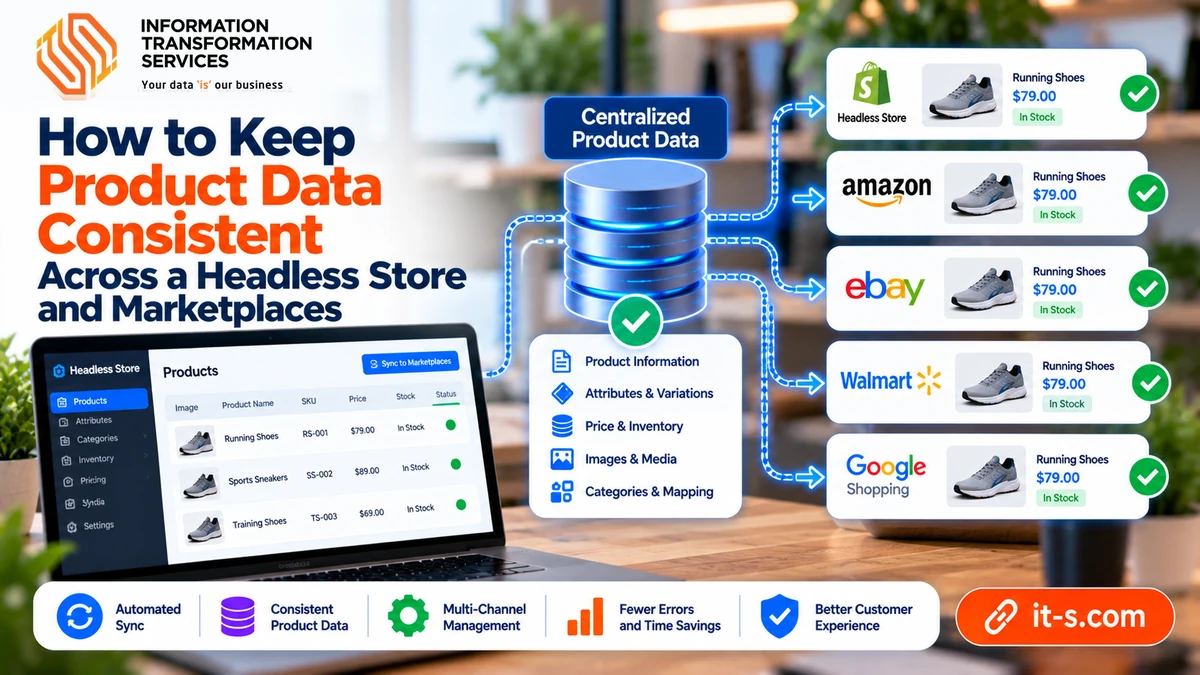
How to Keep Product Data Consistent Across a Headless Store and Marketplaces
Brands that sell through their own storefront and several marketplaces at once tend to hit the same problem sooner or later. Prices, stock levels, specs and images stop matching from one channel to the next. It rarely happens all at once. Small differences build up over weeks, usually because product data gets edited in more than one system.
The effects are easy to underestimate. Google Merchant Center disapproves items when the feed price doesn’t match the product page. Amazon and Walmart may suppress listings with missing or conflicting attributes. Return rates go up when a size chart or material description differs between channels. Keeping data consistent depends less on any single tool and more on two decisions: where product data lives, and who’s allowed to change it.
Going headless changes the plumbing a bit. The storefront and the commerce backend are separate apps talking over APIs, so a product’s title, price and specs take a trip before a shopper sees them. On Shopify, that front end is usually Hydrogen, Shopify’s React framework, which reads the catalog through the Storefront API. Replatforming from a Liquid theme to Hydrogen, a common project for a Shopify Hydrogen agency, changes how product fields travel from the catalog to the page.
That trip is worth mapping out early. The rest of this piece looks at why drift happens, where the master record should sit, and the tools and routines that stop a catalog of 5,000 SKUs from turning into five slightly different catalogs.
So Where Does the Mess Come From?
Mostly from people doing their jobs. A merchandiser edits a product title for a holiday campaign right in the Shopify admin. Someone on the Amazon side fixes a typo inside Seller Central because it’s quicker than filing a ticket. A supplier sends an updated spec PDF, and it lands in one inbox out of three.
None of that is careless. But each edit happens in a different place, and very few systems sync changes backward. So the catalog forks without anyone really noticing, and it can take weeks before a customer complaint or a suppressed listing makes the split visible.
Lots of Editors, No Owner
In a typical mid-size brand, marketing writes copy, ops handles stock, finance sets prices, and there’s often a freelancer running marketplace listings on the side. Four groups, four tools. Each group keeps its own corner tidy. The trouble sits in the gaps between corners, where nobody’s quite responsible.
Marketplaces Want Different Things
Then there are the formats. Amazon cares about bullet points, browse nodes and title rules (which vary by category, annoyingly). eBay leans hard on item specifics. Google Merchant Center won’t take most products without a valid GTIN, and it compares the feed price with the landing page price, so even a few cents of difference can get an item disapproved. Walmart has its own item spec templates on top. Faced with four rulebooks, teams start hand-editing listings per channel. Which works fine, right up until the next update.
Pick One Place Where the Truth Lives
One simple rule saves a lot of pain: data gets edited in one system, and every other system reads from it. Accountants have worked this way for centuries. A company might have dozens of bank cards and payment apps, but there’s one general ledger, and the cards don’t get to rewrite it.
Shopify as the Master Record
For a few hundred SKUs sold through a handful of channels, Shopify itself can be that system. Metafields and metaobjects cover structured attributes like fabric, dimensions, care instructions and compatibility. Shopify’s sales channel apps for Amazon, eBay, Walmart and Google pull straight from those records. The team stays in an admin it already knows, and that counts for more than people tend to expect.
Bringing In a PIM
Things change at a few thousand SKUs, or once there are several languages and regional stores. That’s roughly where a PIM (product information management system) starts to justify its license fee. Akeneo, Salsify, Plytix and Pimcore are the names that come up most often. A PIM gives every attribute a type, scores completeness per channel and logs each change, so it’s easy to see who switched the hoodie’s fabric from 80/20 to 70/30, and when. In this setup Shopify receives data from the PIM instead of owning it, and Hydrogen keeps reading from Shopify as before.
Structure Beats Prose (at Least for Specs)
A master record full of long paragraphs doesn’t help much. Say a description reads “100% organic cotton, 180 GSM, machine wash cold.” A person gets it instantly. A feed tool doesn’t. Split it into material, fabric weight and care fields, and the same facts can show up on the product page, in a Google Shopping feed and in Amazon’s attribute slots without anyone retyping them.
A few habits go a long way here:
Use GS1-issued GTINs for every variant, never made-up barcodes.
Pick one unit per measurement (grams or ounces, not a mix of both).
Keep marketing copy and technical specs in separate fields.
Write a short data dictionary that says what each attribute means and who can change it.
Headless stacks often bring in a CMS as well, like Sanity or Contentful, for editorial pages. That’s fine, as long as the boundary stays clear. Lookbooks, buying guides and brand stories go in the CMS. Anything a marketplace could ask for stays in the commerce layer, because a spec that only exists in Sanity is never going to reach Amazon.
Feeds Should Translate, Not Improvise
Feed tools such as Feedonomics, Rithum (the company formerly known as ChannelAdvisor), GoDataFeed and DataFeedWatch sit between the master record and each marketplace. A decent mental model is a conference interpreter: same speech, different language, no editorializing.
In practice, that means rules. One rule builds an Amazon title from brand, product type, key feature and size; another builds a shorter Google title from the same fields. Change the source attribute and both titles update on the next sync. Manual overrides inside the feed tool are where things go sideways. They’re sometimes needed, sure, but each one should be logged, or the feed tool slowly becomes a second catalog that nobody’s watching.
Timing Matters as Much as Content
A perfectly accurate listing is still wrong if it updates six hours late. For that whole window the storefront and the marketplace show different prices, and Merchant Center is pretty good at noticing.
Price and Stock Go in the Fast Lane
Shopify webhooks (products/update and inventory_levels/update are the usual ones) can push changes to feed tools and connectors within seconds. On the Hydrogen side, cache settings deserve a second look. Hydrogen ships with caching strategies like CacheShort and CacheLong; price and availability usually belong on the short end, while brand pages can sit in cache much longer. Plenty of sellers also keep a small stock buffer on marketplaces (hiding the last two or three units, for instance) so a burst of demand doesn’t end in oversold orders and cancellations.
Everything Else Can Wait a Bit
Long descriptions, images and lifestyle copy rarely need instant sync. A nightly job is usually plenty. Splitting fast and slow data also keeps API calls under Shopify’s rate limits, and it means a giant content update won’t jam the feed halfway through a sale.
Catch Problems Before Shoppers Do
Even well-built systems drift a little. Validation catches most of it. A PIM can refuse to publish a product until required fields are filled in, and Shopify Flow can ping a Slack channel when a variant has no barcode or a price falls below cost.
Audits handle the rest. Once a week, someone checks Merchant Center diagnostics, Amazon’s Account Health page and any suppressed items in Walmart Seller Center. Some teams go a step further with a short script that compares price and stock across channels and flags anything off by more than a set margin. Dull work? Pretty much. It’s also the cheapest way to spot a problem before a customer does.
Somebody Has to Own It
No tool fixes an ownership gap. One person (data steward, catalog manager, whatever the title ends up being) should own the master record and sign off on structural changes like new attributes or category mappings. Other teams can request edits; they just don’t make them in the channels directly.
It doesn’t need to be heavy. A change log, a shared data dictionary and a 15-minute catalog check-in each week cover most of it. The idea is to make the correct route the easiest one, so the “just fix it in Seller Central real quick” habit fades out on its own.
The same thinking applies when adding a channel. Before going live on Zalando, Etsy or TikTok Shop, map each required field to an attribute that already exists in the master record. Missing one? Add it there first, then let the feed carry it over.
Summing It Up
Product data stays consistent across a headless store and marketplaces when it has one home, a clear structure and an owner. Shopify can be that home for smaller catalogs; a PIM like Akeneo or Salsify takes over as things grow. Feed tools should translate the data rather than rewrite it, and price and stock need the fastest sync the stack can handle.
Add basic validation and a weekly audit, and most drift gets caught early. It isn’t flashy work. Still, fewer suppressed listings, fewer confused customers and a catalog the whole team trusts are a solid return on a few well-kept habits.