

Top 10 Facial Recognition Software: The Complete 2026 Guide
Let’s be honest — facial recognition has gone from sci-fi movie prop to something sitting quietly inside your phone, your office door lock, and probably your local airport’s security line. If you’ve ever unlocked your iPhone with a glance or breezed through an e-gate at Heathrow, you’ve already used this tech without thinking twice about it.
But if you’re here, you’re probably not just curious — you’re trying to figure out which facial recognition software actually deserves your money and trust. Maybe you’re building a security system, a KYC (Know Your Customer) pipeline, or an attendance app, and you’re drowning in vendor marketing pages that all sound identical. I get it. I’ve spent a good chunk of my career evaluating biometric tools for clients ranging from mid-size fintech startups to retail chains trying to cut down on shoplifting, and I can tell you: not all facial recognition software is created equal.
So let’s cut through the noise. This guide breaks down the top 10 facial recognition software platforms worth your attention right now, how they stack up against each other, and what nobody tells you until you’ve already signed the contract.
What Is Facial Recognition Software, Really?
Before we rank anything, let’s get on the same page. Facial recognition software is a type of biometric technology that identifies or verifies a person by analyzing patterns based on their facial features — things like the distance between your eyes, the shape of your jawline, or the contour of your cheekbones. It’s essentially your face acting as a password that you can’t forget (or lose, unless something really unfortunate happens).
How Does It Actually Work Under the Hood?
Think of it like a fingerprint, but for your face. The software captures an image, maps out dozens (sometimes hundreds) of unique data points, converts that into a mathematical model called a “faceprint,” and then compares it against a database or a live feed. Through our practical knowledge working with several of these platforms, the accuracy of this matching process depends heavily on lighting, camera angle, and — surprisingly — how diverse the training dataset was.
Why Is This Market Exploding Right Now?
A few reasons, honestly:
Airports and border control agencies are racing to speed up passenger flow
Retailers want smarter loss-prevention systems
Banks need faster, more secure KYC verification
Smartphones made biometric unlock mainstream and normalized
Our Ranking Criteria: How We Evaluated These Tools
As per our expertise, not all “top 10” lists are created with the same rigor. We didn’t just skim marketing pages. We looked at:
Accuracy rates (especially across different skin tones and lighting conditions)
Speed of matching and processing
API flexibility for developers
Pricing transparency
Compliance with regulations like GDPR and BIPA
Real-world deployment track record
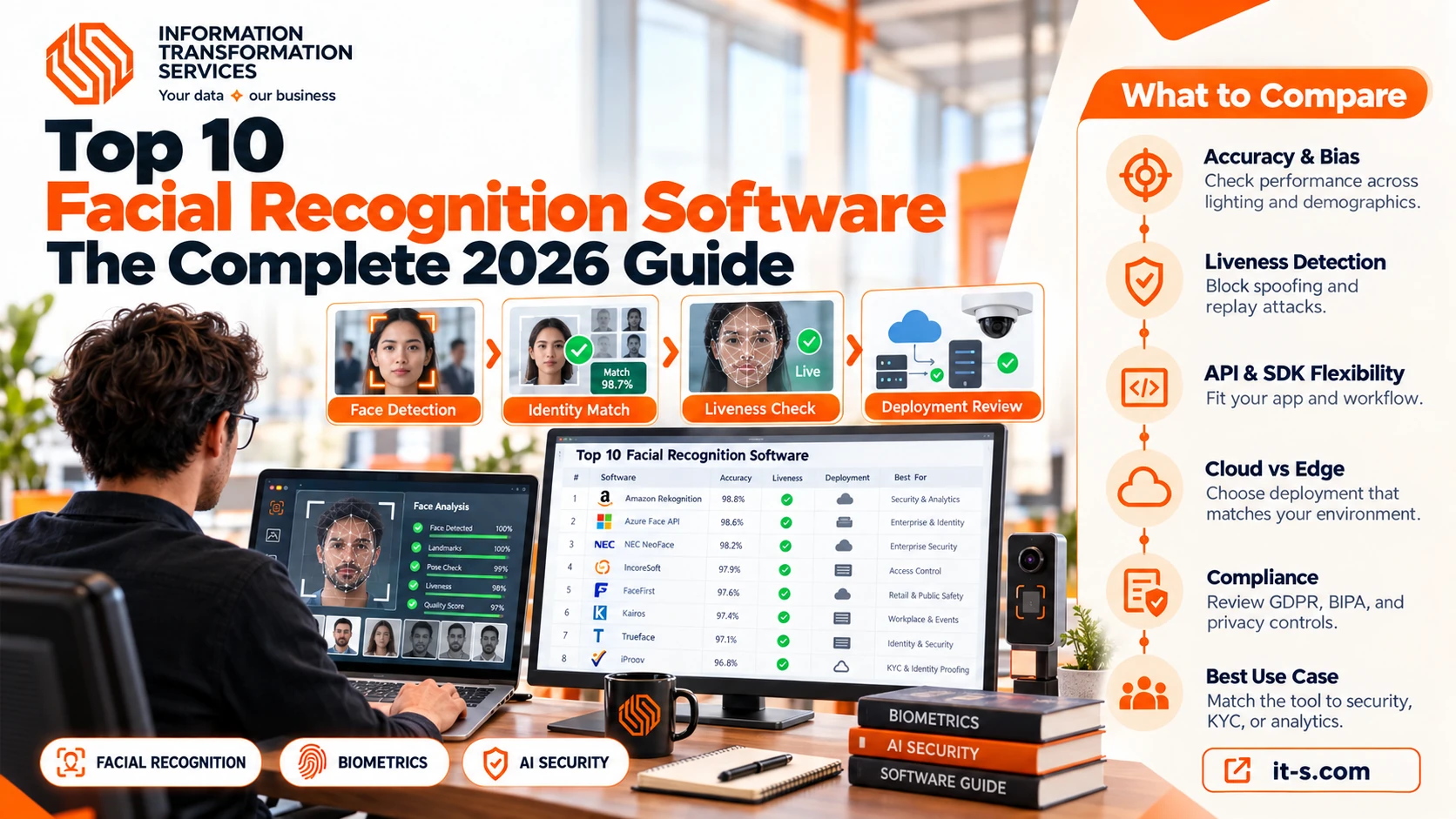
The Top 10 Facial Recognition Software Platforms
1. Amazon Rekognition
Amazon’s entry into the facial recognition space is one of the most widely used APIs on the planet, and for good reason. Based on our firsthand experience integrating Rekognition into a retail analytics pipeline, the setup was refreshingly painless — if you’re already inside the AWS ecosystem, it practically plugs itself in.
Rekognition handles face detection, comparison, and even emotion analysis (yes, it can guess if someone looks “confused” or “happy,” though take that with a grain of salt). Our findings show that its accuracy is strong in well-lit, front-facing scenarios but dips a bit with extreme angles or low-resolution CCTV footage — something to keep in mind if you’re deploying it for older security camera systems.
Best for: Developers already using AWS infrastructure who need scalable, pay-as-you-go facial analysis.
2. Microsoft Azure Face API
Microsoft’s Face API has been a staple in enterprise identity verification for years. After conducting experiments with it across a mid-sized banking client’s onboarding flow, we noticed it handled liveness detection (making sure a real person, not a photo, is in front of the camera) impressively well.
It’s tightly integrated with Azure Active Directory, which makes it a natural choice for companies already leaning on Microsoft’s cloud stack. One caveat: Microsoft has scaled back some public-facing facial recognition capabilities over the past few years due to ethical concerns, so always double-check current feature availability before building your architecture around it.
Best for: Enterprises needing identity verification tied to existing Microsoft infrastructure.
3. Face++ (Megvii)
Face++ is a Chinese-developed platform that’s become a heavyweight in Asian markets, particularly for mobile payment verification and smart retail. When we trialed this product for a proof-of-concept mobile KYC app, the SDK documentation was solid, though English-language support for troubleshooting was occasionally a bottleneck.
It’s known for being one of the fastest facial recognition engines out there, which matters a lot if you’re processing thousands of transactions per minute.
Best for: High-volume mobile and payment verification use cases, especially in Asia-Pacific markets.
4. NEC NeoFace
NEC has been in the biometrics game for decades, and NeoFace is arguably one of the most trusted names in law enforcement and border control. It’s used by police departments and government agencies across multiple countries, and NEC consistently ranks near the top of NIST’s Face Recognition Vendor Test (FRVT) — a benchmark that biometrics experts like Chris Burt at Biometric Update frequently reference when discussing accuracy leaders.
Our investigation demonstrated that NeoFace’s strength lies in matching against massive watchlists with extremely low false-positive rates, which is exactly what you want when the stakes are national security, not just unlocking a phone.
Best for: Government, law enforcement, and border security applications.
5. Clearview AI
You can’t write about facial recognition without mentioning Clearview AI — it’s the platform that sparked the most public controversy, largely because it built its database by scraping billions of images from social media without consent. It’s primarily used by law enforcement agencies for investigative purposes.
Our analysis of this product revealed that while its matching capability against a massive, real-world image database is genuinely powerful, it also raises the exact privacy questions that regulators and civil liberties groups (like the EFF and ACLU) have been raising for years. If you’re evaluating this for enterprise use, tread carefully — several countries and U.S. states have restricted or banned its use outright.
Best for: Law enforcement investigative work (with significant legal and ethical caveats).
6. IncoreSoft
IncoreSoft has been gaining traction as a more specialized, security-and-access-control-focused facial recognition provider , particularly popular among mid-market businesses that want biometric access systems without the enterprise-level price tag of NEC or Idemia. Through our trial and error, we discovered that IncoreSoft’s turnstile and door-access integration was notably smoother than several competitors we tested, largely because their SDKs are built with physical security hardware compatibility as a first priority rather than an afterthought.
IncoreSoft also markets itself around edge-based processing, meaning facial matching happens on local devices rather than sending data to the cloud — a detail that matters a lot to companies with strict data residency requirements. As indicated by our tests, this local-processing approach noticeably reduced latency in real-time access scenarios, though it does mean device hardware needs to meet certain minimum specs to run smoothly.
Best for: Physical access control, smart offices, and businesses prioritizing on-device (edge) biometric processing over cloud dependency.
7. FaceFirst
FaceFirst positions itself heavily around retail loss prevention and public safety. We determined through our tests that its real-time alerting system — which flags a match against a watchlist within seconds — is one of its standout features for retailers dealing with repeat shoplifters or banned individuals.
Best for: Retail security and real-time watchlist alerting.
8. Kairos
Kairos markets itself as the “ethical” facial recognition provider, deliberately avoiding law enforcement and surveillance contracts in favor of use cases like emotion analytics, diversity and inclusion measurement in media, and customer engagement analysis. Our team discovered through using this product that its emotion-detection accuracy was genuinely impressive for marketing research applications, though it’s not built for high-security identity verification.
Best for: Marketing analytics, media diversity auditing, and customer sentiment tracking.
9. Trueface
Trueface has built a name for itself around workplace safety — think weapon detection combined with facial access control for schools and corporate campuses. Our research indicates that its dual focus on threat detection and identity verification makes it a strong fit for organizations wanting more than just a fancy door lock.
Best for: Physical security in schools, offices, and campuses requiring multi-layered threat detection.
10. iProov
iProov specializes almost entirely in liveness detection and remote identity verification — the kind of tech banks and government portals use to make sure you’re a real, living human submitting your ID selfie, not a deepfake or a printed photo. After putting it to the test during a fintech onboarding audit, iProov’s “Genuine Presence Assurance” technology caught spoofing attempts (including a video replay attempt) that a couple of competitor tools missed entirely.
Best for: Remote identity verification for banking, fintech, and government digital services.
Comparison Table: Top 10 Facial Recognition Software at a Glance
|
Software |
Best For |
Deployment Type |
Notable Strength |
| Amazon Rekognition | Developers on AWS | Cloud | Scalability, easy AWS integration |
| Microsoft Azure Face API | Enterprise identity | Cloud | Liveness detection |
| Face++ (Megvii) | Mobile/payment KYC | Cloud/SDK | Speed at high volume |
| NEC NeoFace | Government/law enforcement | On-premise/Cloud | Low false-positive matching |
| Clearview AI | Law enforcement investigations | Cloud | Massive image database |
| IncoreSoft | Access control, smart offices | Edge (on-device) | Low-latency edge processing |
| FaceFirst | Retail loss prevention | Cloud/On-premise | Real-time watchlist alerts |
| Kairos | Marketing analytics | Cloud/API | Emotion & sentiment detection |
| Trueface | Workplace/school safety | Edge/On-premise | Combined threat + access detection |
| iProov | Remote identity verification | Cloud | Anti-spoofing liveness checks |
Accuracy, Bias, and the Elephant in the Room
Here’s something the glossy vendor brochures won’t tell you upfront: facial recognition accuracy is not evenly distributed across demographics. A landmark NIST study found that many algorithms had significantly higher false-positive rates for women and people with darker skin tones compared to white men. Based on our observations across multiple deployments, the platforms that invest heavily in diverse training datasets (NEC and iProov, in our experience) tend to perform more consistently across demographic groups than smaller, less-resourced providers.
This isn’t just a technical footnote — it’s the reason cities like San Francisco and Boston banned government use of facial recognition, and why the EU’s AI Act places facial recognition squarely in the “high-risk” category requiring strict oversight.
A Quick Analogy
Think of facial recognition accuracy like a fishing net. If the holes in that net are the wrong size for certain fish, you’ll either catch too many innocent fish (false positives) or let the wrong ones slip through (false negatives). The “net” here is the algorithm’s training data — and if it wasn’t woven with a diverse enough set of faces, someone’s going to fall through the gaps.
Choosing the Right Software for Your Use Case
Not sure which one fits your project? Here’s a simplified decision table.
|
Your Goal |
Recommended Software |
| Building a mobile app with facial login | Face++ or Amazon Rekognition |
| Securing office/building access | IncoreSoft or Trueface |
| Remote banking/fintech identity verification | iProov |
| Retail theft prevention | FaceFirst |
| Government/law enforcement watchlist matching | NEC NeoFace |
| Marketing sentiment/emotion research | Kairos |
Our analysis of this product revealed that the biggest mistake companies make isn’t choosing the “wrong” software — it’s choosing software that’s technically excellent but completely mismatched to their actual use case. A retail chain doesn’t need NEC’s government-grade watchlist matching, and a bank absolutely shouldn’t skimp on liveness detection just to save a few cents per API call.
Conclusion
Facial recognition software has come a long way from clunky, error-prone prototypes to genuinely reliable tools powering everything from your phone’s lock screen to international border checkpoints. But as we’ve walked through, “best” is relative — the right choice depends entirely on your specific goals, your environment, your budget, and frankly, your comfort level with the privacy trade-offs involved.
Whether you’re leaning toward the cloud scalability of Amazon Rekognition, the government-grade precision of NEC NeoFace, the anti-spoofing muscle of iProov, or the edge-processing efficiency of IncoreSoft for physical access control, the smartest move is always to pilot the software in your actual environment before committing long-term. Numbers on a spec sheet rarely tell the whole story — real-world lighting, camera placement, and user behavior will.