

How Small Businesses Can Connect CRM Data and Reduce Manual Administrative Work
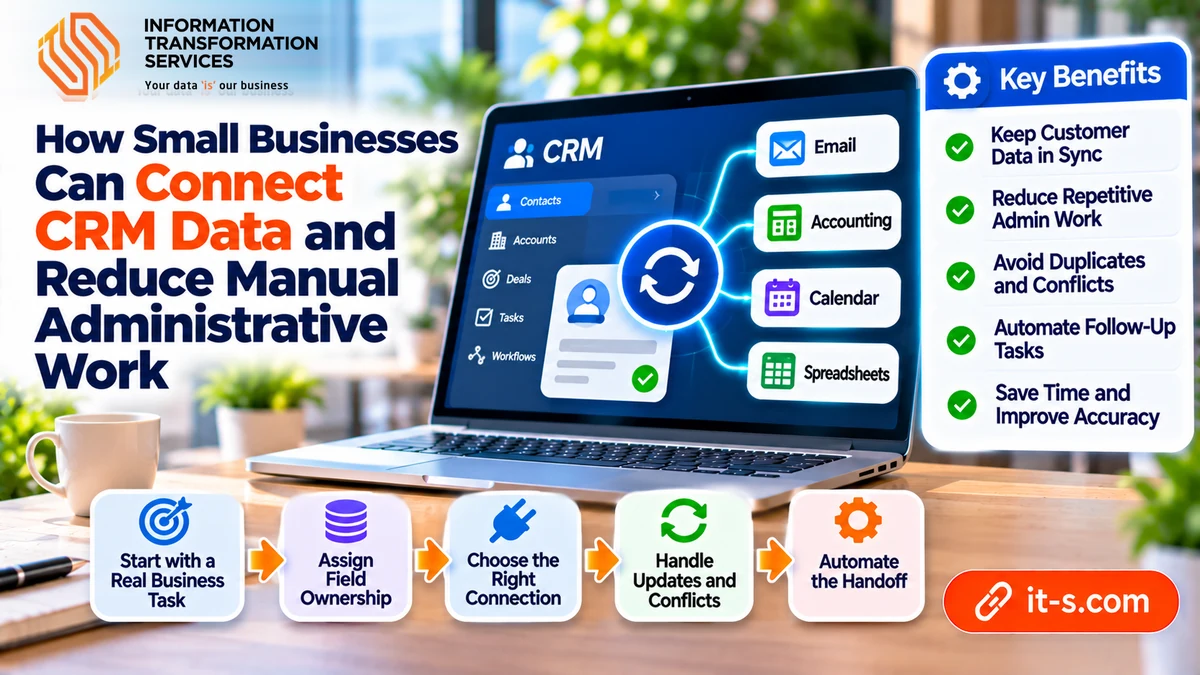
Small businesses can reduce CRM administration by deciding which system owns each piece of customer information, then connecting only the data and actions that support daily work. Synchronization becomes reliable when updates, duplicates, and conflicts have clear rules. Connecting applications without those rules can spread the same confusion across more screens.
A customer relationship management system stores information used to manage customer relationships and related activity. Synchronization keeps selected information consistent between systems. Workflow automation uses an event or condition to trigger an action, such as creating a follow-up task. These capabilities often work together, but they solve different problems.
Start with the information employees actually use
List where staff create and update contacts. A typical business may use a CRM, email, accounting software, and a shared spreadsheet. Mobile devices may introduce another place where a phone number changes without reaching the main record.
Choose one recurring task to investigate, such as preparing a new customer’s first invoice. Identify the fields required for that task and where each originates. Avoid beginning with a plan to synchronize every available field. Unnecessary copies create more maintenance work and can expose information to people who do not need it.
This is the kind of operational problem addressed by 2BBooster, which helps businesses optimize processes and connect existing systems through automation. The practical objective is to reduce repeated administration while preserving the tools employees need for their work.
Assign ownership at the field level
One application does not have to own every customer attribute. The CRM might own the sales contact and account owner, while accounting owns the billing account identifier and payment status. Record which application can update each shared field and which applications should only receive it.
Use a stable customer identifier to link records where possible. Names and email addresses can change, and two people can share similar names. Define how records are matched, how uncertain matches are reviewed, and who can merge duplicates.
Treat blank values carefully. A missing phone number in one system should not automatically erase a verified number elsewhere. Similarly, decide whether deleting a contact in one application should delete it everywhere or only end synchronization. These decisions should be made before the first broad update.
Choose the connection that fits the task
A supported native connector may meet a simple requirement. More complex field mappings or workflow rules may require an integration platform or a tailored connection. Check the specific application versions, available fields, update direction, and access requirements before selecting a method.
For a small team, mapping and improving administrative workflows can reveal whether the main problem is missing connectivity or an unclear process. A connector cannot decide who owns a customer if managers have never agreed on the assignment rule.
Choose an update frequency that fits the work. An internal report may tolerate a scheduled batch. A change that affects an imminent customer appointment may need faster propagation. Record the expected delay so employees know whether a missing update is still within the normal processing window.
Design for simultaneous changes
Consider an illustrative service company. An account manager updates a customer’s contact details while finance corrects the legal billing name. A broad rule that always replaces the entire record with the latest version could discard one valid change.
Field-level ownership avoids that conflict when each team edits the information it controls. Where two systems can update the same field, define a conflict rule and retain enough history to investigate. Sending ambiguous conflicts to a designated employee may be safer than assuming the newest timestamp always represents the correct value.
Prevent circular updates as well. A change copied from the CRM should not return as a new change that triggers another round of notifications. Test whether the integration can recognize its own updates and whether repeated events create duplicate tasks.
Automate the handoff after the record is reliable
Once an approved customer record reaches accounting, the workflow might create an invoice preparation task and notify its owner. The notification should identify the record, the required action, and any missing information. Sending another email without clear ownership does little to reduce administration.
Pilot the workflow with a limited set of records. Test an existing customer, a new customer, a duplicate, an incomplete address, and a failed connection. Confirm that staff can pause processing, correct a record, and resume without losing changes.
Track the number of manual corrections, duplicate records, and failed updates. Also measure the time employees spend checking whether synchronization worked. A connection that requires constant supervision may simply replace one kind of administrative effort with another.
Document access permissions and review them when staff roles change. Use dedicated integration credentials where the applications support them, and assign an owner for connection failures. The team needs to know who will investigate if updates stop during an absence.
Common Questions About CRM Synchronization
Must a business replace its existing CRM
Not necessarily. Confirm whether the current applications can exchange the required information and support the workflow. Replacement becomes a separate decision if essential capabilities or supported interfaces are unavailable.
Should every connection be bidirectional
No. One-way updates can be easier to control when one system owns a field. Enable two-way changes only where users need them and the conflict rules are understood.
Final Thoughts
Connected customer data becomes useful when employees can trust where it came from and know what happens next. Start with a narrow business task, assign ownership to its fields, and define how the connection handles incomplete or conflicting records. Test the awkward cases before expanding access or volume. A successful implementation should reduce correction work and uncertainty as well as typing. Keeping those outcomes visible helps a small business retain effective tools while improving the administrative process that connects them.
If staff repeatedly copy the same customer information between applications, a focused CRM integration and customization assessment can establish the required mappings and controls. Bring a field list and examples of conflicting records so the proposed connection reflects the way your team manages customers, approvals, and follow-up work.